Individuals who have been notified by Power Factors of the need to establish an account in our central authentication portal should follow the steps below. If you have not received an email from Power Factors, the steps below will not work.
Step 1:
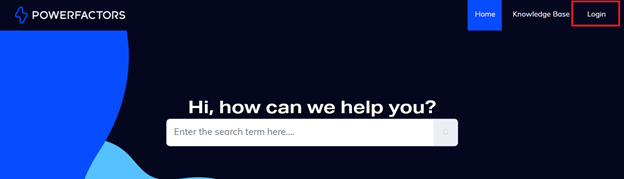
Visit https://support.powerfactors.com/ and select “Login” from the upper right corner.
Step 2:
Click “Login here” next to “Are you a customer?”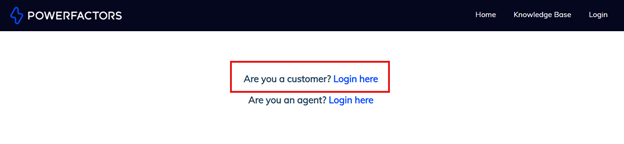
Step 3:
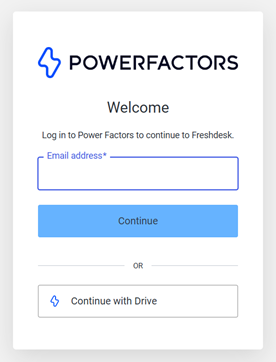
Enter your email address and click the Continue button.
Step 4:
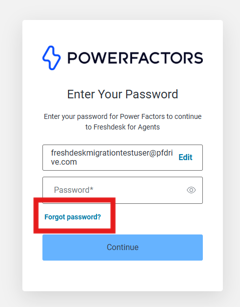
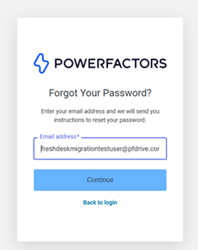
Click on Forgot Password?
Step 5:
Enter your email address and click Continue.
Step 6:
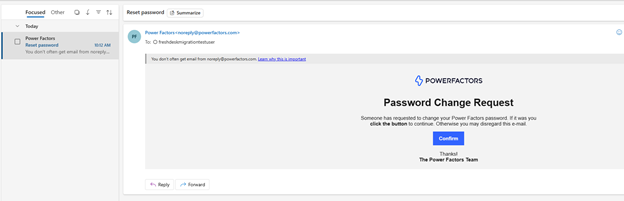
Check your email as you will receive an email with the subject “Reset password” from noreply@powerfactors.com. Click the Continue button in that message to set your password.
Step 7:
Once you have reset your password, return to https://support.powerfactors.com/ and follow steps one, two and three above. Follow the prompts to log in.
Was this article helpful?
That’s Great!
Thank you for your feedback
Sorry! We couldn't be helpful
Thank you for your feedback
Feedback sent
We appreciate your effort and will try to fix the article